Wednesday, September 13, 2017

Storage Automation: A Great Adventure - Red Pill

Image result for matrix take the blue pill picture

Welcome back to our adventure down the Storage Automation (Notice I didn't use DevOps, I've noticed that the term has gotten some negative vibes as of late) using APIs! This post is going to highlight my "Major" breakthrough on an API call to the VMAX.
Now that you've decided to take the Red Pill and see how far the rabbit hole goes, Let's dive in!

I started my quest with the help of the the Unisphere for VMAX REST Client, which is a GUI that allows you to browse and experiment with the API calls available for the VMAX. Below is a screenshot of the API call that we will be diving into today (I know it's an extremely basic API call, but we have to start somewhere).


My next hurdle to clear was to figure out how to make this same call within Python and fortunately, along came Paul Martin (@rawstorage) to introduce me to the PyU4V Project, where some genius engineers at EMC took the initiative to help the community out and put in some tremendous leg work in making this leap into the VMAX API world much less daunting.

At this point, now that I had PyU4V setup, configured, & running, I wanted to take a step back and learn (at it's base) what was truly happening behind the scenes. I like to take a look under the hood and learn how something works before I just jump whole heartedly into using it because it gives me a better perspective and base to work with later down the road.

I tore apart the modules within PyU4V and with a bit of cohersing, I was able to come up with a way to make the call outside the tool and pull back the results I was wanting in a JSON format. Below is that simple Python Script/Call to accomplish the same thing we did with the RESTClient from above (GitHub Project).


This may not seem like much at the moment, but we will be taking this building block and working on creating a reporting tool which will give us much more visibility into the array, and even further down that road, maybe even taking some automated action against the array based on the input from the API call.

Thanks for sticking with me for another episode of this adventure. Let's continue to see where this takes us!

Whats up Next?


    Now that we have a simple API call to build upon, I plan to work down the route of fleshing out the Python Script to pull in all LUNs Storage Capacity & Allocated Percent and format it in a usable fashion. This will set us up for our next step of integrating it it into a monitoring tool for visualization.

    Tools Used in the Making of this Episode


      • PyCharm: Python IDE that seems to have favor of the community
      • PyU4V Project: GUI for building API Calls to the VMAX


      Special Thanks


      Thursday, August 31, 2017

      Storage DevOps: A Great Adventure - The Prelude

      Related image

      I recently came to the realization that I just CAN'T do it all. 
      The past year I have been trying to:
      • Get Field Specific Certs
        • EMC Storage
        • VMWare DCV & NSX
      • Learn Everything I can about Storage (EMC Specifically)
      • Learn all I can about Python, Perl, & several other programming languages popular in the DevOps world
      • Learn ALL I can pertaining to the DevOps way of life and the mentality behind it


      This, in turn, has left me run ragged after a year of constant 100% balls to the wall action. Due to this I had to pull away for a week or so and lay everything out on the table to re-priortize & focus my goals to be a bit more realistic and reachable (It's all about those baby steps).

      I've done some initial research and digging into what DevOps truly is and what impact it has within Storage. 
      Below is what, in my opinion & Point of View, I have unearthed:
      • Definition: Automating Tasks for a layer of hardware that would otherwise be an arduous task manually, which more than likely will also result in inconsistent results
      • 3 Steps/Layers
        • Monitor/Reporting (This is where I sit today): Using APIs/CLI to pull information out of the system and formatting that data into a usable report
          • This is the least intrusive place to start your journey into the DevOps world
        • Move/Add/Change: Using APIs/CLI to create or adjust config within the layer of hardware
          • This is your 2nd step in this crazy world because it is a little more intrusive in nature and means you need some experience and insight before implementing
        • Full Automation
          • This is the Big Daddy of them all because you are giving the hardware full reign to roll with the punches and even self heal

      As I mentioned in the list above, I have done some work within the Monitor/Reporting Layer for the last 6-8 Months. My Co-Worker and I have built a Suite of Modules that gives us some crucial insight & even predict (Yes! We have a Crystal Ball) into all of our Storage arrays across the enterprise. This work has saved our ass multiple times and has been well worth our investment in time and effort. That being said, at its' base we are using basic CLI commands to poll the arrays and there is nothing wrong with that but my goal here is to build on that foundation and move into the API side of things.

      Moving forward, I plan to focus on the more trending side of the Storage world and that is pretty obviously the Monitoring, Reporting, Move/Add/Change, & ultimately the Full Automation of Storage thru APIs (as the hook into the arrays) & Python (as the programming language to make it all happen).

      Please Join me in my adventure down the Storage DevOps Rabbit Hole and let's see what we can create.


      Special Thanks


      • Ryan Booth (@that1guy15) for helping mentor me and push me in the right direction
      • TheNetworkCollective for your PodCast on Network Automation (Inspiration)
      • Paul Martin (@rawstorage) for your in depth conversation on VMAX APIs thru Python
      • Bowie Poag for ushering me into & opening my eyes to the possibilities in Monitoring/Reporting of Storage

      Tuesday, June 27, 2017

      Windows Backup (BKF) File Restore on Windows 10

      Task at Hand


      Restore Files/Directories from a Windows Backup (.bkf) on Windows 10

      Personal Blurb


      I recently had a Windows 2003 Server running on almost 10 year old hardware finally took a dive to the point of no return. Due to this I had to learn how to crack into a .bkf file and restore some files, but that apparently isn't as easy as you might think from a Windows 10 PC. So below is my findings on how to go about doing this.

      Let's get to Work!


      1. Download nt5backup.cab
      2. Unzip the CAB File with 7-Zip (Or a similar Unzip Application)
      3. Go to ./nt5backup/files & Double Click on ntbackup.exe
      4. Validate the “Always start in wizard mode” Checkbox is selected & Click Next
      5. Select “Restore files and settings” & Click Next
      6. Hit the Browse Button and Browse to the Server’s .bkf File

      7. Select the File/Files/Directory that is being requested to be restored & Click Next
      8. Hit the Advanced Button
      9. Select “Alternate location” in the Restore files to: Dropdown box & Browse to the New Location to drop the restored files into.
      10. Click Next & Select Leave existing files (Recommended)
      11. Click Next Leave Restore security settings & Preserve existing volume points Checkboxes & Click Next
      12. Click Finish & Watch it Roll

      Monday, June 26, 2017

      UniFi: Purchase & Setup Guide


      Task at Hand


      Guide anyone interested in the UniFi Network Stack for home or business based on my experience with the whole process

      Personal Blurb


      I have had an amazing experience with UniFi, starting with Ubiquiti support when asking for recommendations on a build for my house to implementing that suggested equipment

      My Build


      Router: UniFi Security Gateway (USG)

      Cloud Management: UniFi Cloud Key

      Switch: UniFi Switch 16 150W (POE+)

      APs: UniFi AP AC LR (POE) x 3
       

      My Build Out (Still needs some cleanup, but its getting there):


      Note: I purchased all my equipment through Amazon because I'm a Prime member and they offer great discounts on this equipment

      Let's get to Work!


      I'd love to give ya'll a step by step guide on how to set this up at the house, but I truly can't and the reason why is because it is so damn easy!

      I honestly would be insulting ya'll if I tried to instruct you on how to install the full stack.

      The hardest part of the setup was running the physical cable from the Switch out to the APs and below is why that was a bit more difficult than I had expected. That is my kitchen after my Big Fella body fell thru it running my last strand of Cat6 in the attic.


      It all turned out well and we were able to patch it and make it look brand new. All that being said, it was well worth even this because I love my UniFi setup!

      Cool Features & Advantages (I've Found So Far...)


      • User Dashboard in General
        • This thing is just amazing & Beautiful! It provides the most info about my network that I have ever seen in any other product available to a Consumer
      • Deep Packet Inspection (DPI)
        • This will give you a very in depth look at each device and their inbound & outbound data

      • Clients List
        • Shows Clients on the network with a drill down to each network device and it's clients
      • Coverage Map
        • I know this isn't the most exciting feature in the world, but I though it was worth mentioning

      MDS: Firware Upgrade

      Task at Hand


      Upgrade Cisco MDS (9706 specifically in my case)

      Personal Blurb


      I decided it was high time to upgrade our MDS 9706's to the Cisco recommended code, so I set out on the, at first glance, daunting task of upgrading our MDSes.

      Prep (Very Important!)


      Validate that each of your Hosts is Dual Legged so that if you need to reboot each side of the SAN that they will not lose connection to their storage.

      Let's get to Work!


      1. Download the Target Code from Cisco's website (This requires that you have a Cisco Account)
      2. Use a TFTP Server to move the firmware over to the MDS Switches (I used tftpd)
        • Location to Transfer to on the Switch: bootflash:
        • Copy Commands
          • copy tftp://<tftpd_server>/mdsfirmware/<Firmware_bin_file> bootflash:<firmware_bin_file>
          • copy tftp://<tftpd server>/mdsfirmware/<firmware_bin_file> bootflash:<firmware_bin_file>
      3. Save your current MDS config files off to a safe location (We use Solarwinds)
      4. Install Firmware on Switch A
        • Install Command
          • install all kickstart bootflash:<firmware_bin_file_from_step_2> system bootflash:<firmware_bin_file_from_step_2>
      5. Validate the Install was successful on Switch A
        • show module
          • This should show the new version was installed
      6. Wait 30 Minutes (You could probably do a shorter time frame, but this is my safety net)
      7. Repeat Steps 2 thru 5 on Switch B

      References


      Thursday, March 23, 2017

      Cisco Networking Cheat Sheet

      Task at Hand


      Provide a comprehensive list of useful Cisco Networking commands. This list will continue to grow as I find more useful commands

      Personal Blurb


      This is my personal list of Cisco Networking based commands that I've found helpful throughout my my working inside that world

      CLI Cheat Sheet (Mileage may vary depending on OS Version)


      Display Commands
      • Show Running Configuration for a specific Interface: sh run int eth<switch>/1/<port>
      • Show vLANs on Switch: sh vlan | inc <VLAN Name>
      • Find Device MAC based on IP Address:  sh ip arp <ip address>
        • Switch has to have Layer 3 Enabled
      Configuration Commands (Assuming you are in config terminal)
      • Configure 1 Port: 
        • Enter Config for the specific port: interface ethernet<switch id>/1/<port id>
        • Change Specific Port Setting:
          • Example
            • Down the port: shut
            • Up the Port: no shut
            • Set the VLAN Access: switchport access vlan 300
            • etc...
      • Configure a Range of Ports (separated by "-"): interface ethernet<switch id>/1/<port id>-<port id>
        • Example - interface ethernet101/1/1-10
          • This will allow you to configure ports 1 thru 10 at once
      • Configure a Group of Ports (separated by ","): interface ethernet<switch id>/1/<port id>,ethernet<switch id>/1/<port id>
        • Example - interface ethernet101/1/1,3,5
          • This will allow you to configure ports 1, 3, & 5 at once
      • "Null Out" a Port: ip route <ip address> 255.255.255.255 null0
        • This will shutdown the port's traffic without having to administratively shut it down

      Thursday, March 16, 2017

      Isilon: Re-IP a Subnet


      Task at Hand


      Re-IP a Subnet on an Isilon Cluster

      Personal Blurb


      I was recently handed a task to re-ip a subnet in one of our Isilon clusters, which at first glance I had a bit of a panic moment. After I had some time to cool down, I went about creating a task list of how I would go about this. As soon as I broke this task into the appropriate steps, it took some of the edge off of the project.

      Let's get to Work!


      1. Remove & Create A Record for the new SmartConnect IP
        1. Log into the appropriate domain controller using your "Administrator" account
        2. Open DNS Manager
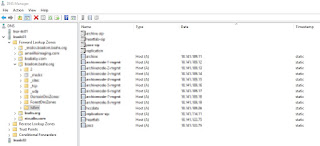
        3. In the console tree, expand the appropriate domain's Forward Lookup Zones
        4. In most cases, you will have a sub folder/domain named "Isilon". Expand the Isilon sub domain
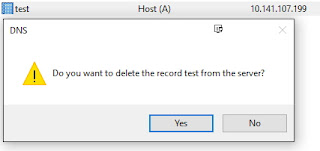
        5. Remove Original A Record for the Old SmartConnect IP
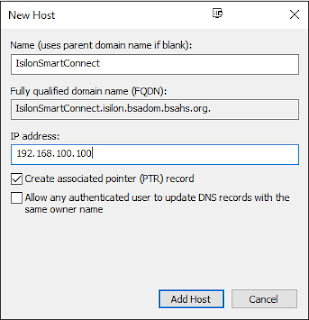
        6. Create an A Record for the New SmartConnect IP

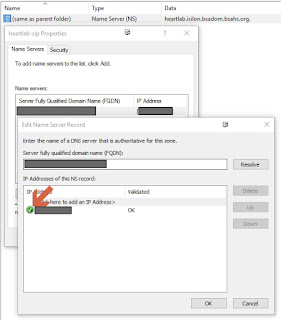
      2. Adjust Delegation in DNS to point to the new SmartConnect IP

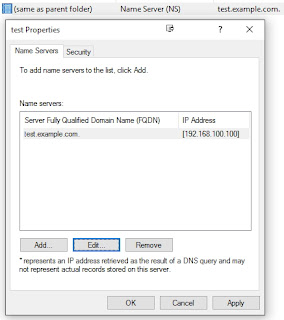
        1. Open the properties on the respective delegation record
        2. Adjust the "NS" Record to use the New Smartconnect IP

      3. Delete Original Subnet

        1. Connect to your Isilon Cluster Web GUI
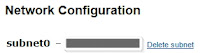
        2. Open up Cluster Management > Network Configuration
        3. Select the appropriate Subnet
        4. Select "Delete Subnet" link to the right of the subnet's name

      4. Create Subnet

        1. Connect to your Isilon Cluster Web GUI
        2. Open up Cluster Management > Network Configuration
        3. Select "Add subnet"
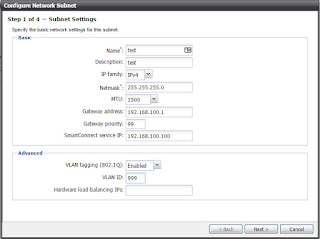
        4. Fill out the Subnet Form 
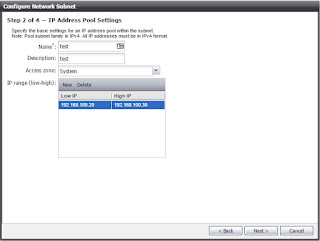
        5. Fill out the IP Address Pool Form
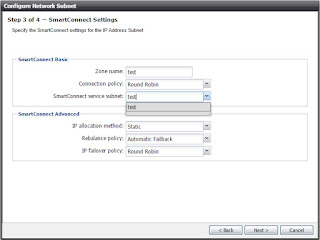
        6. Fill out the SmartConnect Settings Form
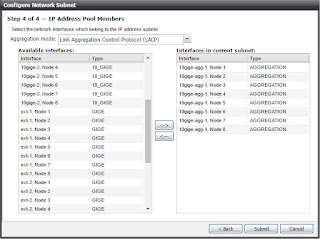
        7. Select & Configure which Node Interfaces will be used by this Subnet
        8. Hit Submit

      5. Validate the subnets configuration looks good
      6. Validate that the DNS Delegation NS Record shows to be connected
      7.  You are now Up and Running on the new IP Scheme!

      Side Note


      I worked with an EMC Tech on this Playbook and he helped tweak a couple of points, but he gave his rubber stamp, which was really nice to have before I moved forward with the execution.

      References


      Monday, May 9, 2016

      EMC World 2016: Biggest Takeaways

      So Much...

      There were so many announcements and so much excitement going on during EMC World last week that I just could not keep up with everything. So I decided to really hone in on a few of the products and do my bets to glean as much as I could during my time. Here is my take on a few of the products/announcements that happened during EMC World this year.

      Unity (Mid-Range)

      Web GUI built on HTML5 (Not Java!)! Enough Said!

      That aside, This product family has some real promise because of its simplicity and scalability. With the price point starting at $10,000 (Mixed Storage) & $18,000 (All Flash) for 2 TB, this makes it a heavy contender in this space again. This will allow EMC to directly battle with companies like PureStorage again!

      I'm going to say it just one more time... HTML5 built GUI

      VCE VxRail/VxRack

      The VxRail/VxRack Products are powerhouses that I think will be heavily utilized in the near future. Right now its a little too bleeding edge for most traditional enterprises to just pick up and run with it, but give it just a little while longer (1-3 years) in the market and let it prove its worth and I think this line-up will be an unstoppable force. They were already touting several huge contenders in the ring that have started digging into this market that are having huge success. 
      I'm excited to see how this pans out and I'm hoping we dig in as well.


      All-Flash Isilon (Nitro)

      I had to mention this because it blew me away that this was a thing! Once the reasoning for this monstrosity was given (Mostly Video Rendering for the larger movie productions) it made a little more sense, but to the small fry like me and mine it just sounded too ridiculous to be real.


      Useful Links/Info

      Breakout Sessions Slide Decks

      Tuesday, April 26, 2016

      EMC World 2016: My Newbie Take - Summary

      EMC World Aftermath

      I quickly realized that at EMC World you better get ready to be overwhelmed! My Head was spinning so hard after the conference was completely over that I didn't know which way was up!

      I was told before I went that I would have to "Choose Wisely" once I got there as to what I would give my attention to. Whether it be Breakout Sessions, vLabs, General Sessions, Mingling with the natives, or even the Expo. This didn't prepare me at all for what was to come.

      As you can see, I was able to keep up with Day 1 of EMC World but I quickly was overwhelmed with all of the activities and events going on. I had to pick and choose carefully what breakout sessions fit our future needs the best, as well as juggle the vLabs as best as possible. All this while going to the keynotes and trying to socialize with everyone that I felt like I should.

      All that being said, I enjoyed every minute of it and wouldn't take it back for anything. I appreciated everything byte of information I was able to download into my tiny brain and the full experience that came along with it.

      I especially appreciate everything that our EMC Guys did for us during this trip down and all the hard work they put into helping us navigate through EMC World the best they could and knew how!

      All in all, this was a great experience for me and I feel that having this knowledge and opportunity will help propel my career forward by leaps and bounds!

      EMC World 2016: My Newbie Take - Day 1

      First Day in EMC World Paradise

      I started out the day with every intention to hit as many breakout sessions as I possibly could, but slowly realized how much was available. I quickly got overwhelmed with the sheer number of possibilities available throughout the day and surprising found myself more focused on the vLabs (Both Self Paced & Instructor Led) instead of the breakout sessions.

      A majority of my day was spent learning more about the new storage product line, Unity Family, that was introduced during the general session that morning. I had a good experience running through one of EMC's first renditions of the Instructor led Unity: Admin and Config class, where we only had a few small snags which is pretty common in a setting like they had.

      I then decided it would be a good idea to hit up some of the self paced labs right next door, where I quickly found out that they were having some major hardware issues on the testing equipment behind the scenes. I tried pushing through these technical difficulties but failed miserably.

      I decided it was time to go take one of my FREE attempts at a Proven EMC Prof. I headed down and registered for a VNX Cert Exam and spent about an hour drudging through that attempt.

      At this point my brain was turning to mush with all the info that was being thrown my way, so I decided it was time to go hit up the Lounge area and try out the amazing cushy bean bags and watch a little bit of EMC TV before I head to the last breakout session of the day.

      I headed towards my first/final breakout session of the day, Unity Multi-Dimensional Flash Flexibility, to get a little deeper look at the hardware behind the new Unity product line. The session had some pretty good information and it also had some data that made my head spin, but at this point it wouldn't have taken much to do so because my brain was just about to give up after the long day I had.

      Stay Tuned for more of my Tales from the Depths of EMC World!

      Sessions

      • General Session: Modernizing The Industry
        • DellEMC started the week with a pretty big bang! I was pretty impressed with what Michael Dell had to say about the future of the Dell/EMC Merger
        • Plus they were giving away laptops! I didn't win, but still
      • Unity: Multi-Dimensional Flash Flexibility
        • This was pretty informational. There was a ton of pretty deep info that made my head spin just a little bit, but overall was a decent breakout

      Tuesday, April 19, 2016

      LifeHack: Taking Notes for a Simpler & Less Stressful Life

      Goals of building this into your Daily Schedule

      • Jot down important milestones of your day/week/month
      • Mark/Check off all items completed throughout your day/week/month (Keep History of all milestones completed)
      • Sleep like you have no care in the world!

      Tools Needed

      • Note App of your choice (Ex: OneNote, Evernote, etc...)
        • My favorite, after playing around with several options, is OneNote
      • Willingness to constantly adapt the process on how you track your day
        • I have been working on and tweaking my process since the start and I've been running with it for about 2 years now

      How I got Started

      I have to admit that I didn't come up with this base idea of keeping a daily journal, I believe it goes way back to to the ancient times of a troubled adolescents. That being said, they were on to something pretty significant by just jotting down important events during their hard day.

      I was discussing my sleepless nights and interrupted dreams with one of my co-workers about 2 years ago and between me and him it was decided that my brain just couldn't stop processing my day and everything it entailed. I started researching this phenomenon and quickly realized that I wasn't the only poor schmuck with this exact issue in the beautiful world of IT.

      After doing some extensive research, during my sleepless nights, I found that several experts in the field of sleep study were hinting towards the fact that one of the leading causes of these sleepless nights is that your brain keeps important "Oh My God I have to remember <fill in the blank>" moments stored in the forefront of your mind and as soon as it gets close to the abyss of forgetfulness it throws up an alarm saying "Don't you dare forget!".

      Now that I've figured out my base issue, it was time to start resolving this thing. This is where the Note App entered the stage. I was looking for a proper journaling app or something along those lines so that I could just start writing down everything that happened during my day in hopes that I could stop the annoying Alerts my brain would send out anytime I got close to that precious REM Sleep. I started just writing everything that went on during my day (both Personal & Work related), but that quickly got too cumbersome and was impeding on my daily tasks. I decided to pull back on the reigns a bit and just list out the important events and to-dos of that day. This was much easier to accomplish since it was just a handful of items.

      After a few weeks of this I decided this still wan't quite what I was looking for. It had helped my sleeping issues marginally, but I still would have those alarms going off every night. After a little more soul searching, I figured out I had missed a crucial piece of the puzzle. Throughout an IT Professionals day we are constantly bombarded with requests and issues that "Have" to be taken care of immediately, but because a day is only 24 hours, it's impossible to get everything taken care of within a day. With this in mind, I was able to find the process that would finally set me free of my annoying brain's reminders for good!

      Finally a Cure

      I had finally found my path to fixing my sleep deprivation that was slowly driving me insane. I started by writing down all the requests & issues that came my way everyday and I marked them complete as soon as I was able to finish them. This eventually evolved into a few separate lists that have led me into the blissful sleep I had been yearning for for so long. I now keep the following lists up to date at all times, which gives me peace of mind and keeps my brain at bay since it is written down and will not get anywhere near that abyss of forgetfulness:

      • Daily Tasks - These are tasks you do on a daily basis
        • Examples
          • Check Storage Array Health
          • Check VMWare VCenter Health
          • Check VMTurbo Suggestions
      • Must Do - Things that come your way that have to be completed in a timely manner
        • Examples
          • Write Blog Post (Like a Boss!)
          • Migrate File Share Server to new Hardware
      • On Hold/Waiting - Any task that you are waiting on someone or something to complete (With explanations as to why they these tasks are on hold)
        • Examples
          • Sign up for VCP6-DCV - Waiting to pass VCA6-DCV
          • Setup Physical Server and Prep for App Analyst - Waiting for specs from App Analyst
      • Nice to Have - These are things that you would like to get done in the near future but don't have a specific date
        • Examples
          • Automate specific tasks, thru scripting, on our storage arrays
          • Create KB article for specific process (Because this never gets put on the back burner)
      • Projects - This is a list of all Major Projects on your plate and it's details (I also tie milestones from projects into my Must Do List)

      Summary

      By keeping the above lists up to date and flowing throughout my day, I was able to appease my brain and finally keep it from sending out alarms at all hours of the night. This process is constantly evolving and I'm coming up with new and improved ways that work best for me. This may be completely different on paper for you than it is for me, but the concept will hold true. If you keep a "Journal" of sorts throughout your day, I truly believe this will help anyone to gain a little more control in your daily life. Don't get discouraged if you start jotting things down and it doesn't feel right to you at first. This will take time and can be frustrating sometimes, but you will find your spot that works best for you. Just keep pressing towards that goal and I promise it will click into place for you.